Global Calling Card

Location
  • Country_us_on
  • Country_canada_off
  • Country_gb_off
English | Español
PennyTalk Mobile for iPhone

Easy Dialing – Low Rates – No Connection Fee

Iphone_3g_vert_pennytalk

With rates as low as 2¢ a minute to over 200 locations, you can call internationally for a fraction of what your mobile carrier might charge. There is no connection fee for calls made using the PennyTalk Mobile app.

With PennyTalk Mobile, a 20-minute call to a landline in the U.K. is just 40¢ (2¢ a minute). The same call with Verizon Wireless would cost $29.80 ($1.49 a minute on the standard non-plan rate). That’s nearly 98% savings with PennyTalk Mobile!

FREE Trial -- Start with up to 50 minutes of free international calls on us

Download the app, choose "Get up to 50 Free Minutes" and you’re on your way. We’ll give you a $1 credit toward free international calls.

With rates as low as 2¢ a minute to many countries around the world, you can talk for nearly an hour on us. Talk to friends in Mexico, China, Chile, Italy, Germany, Australia and more for just 2¢ a minute. Click here for rates.

If you already have a PennyTalk account, skip the Free Trial step and still get your free $1 credit simply by logging into your existing PennyTalk account from within the app.

It’s so easy to make calls!

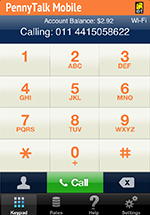
PennyTalk Mobile makes international calling easy and convenient. Whenever you want to make an international call, launch the PennyTalk Mobile app. Go to the PennyTalk Mobile keypad and access your phone contact list for one-tap dialing, or dial the international number you want to call directly into the app's keypad.

Be sure you’ve launched the PennyTalk Mobile app before making a call to enjoy PennyTalk’s great low rates.

PennyTalk Mobile is better than other international calling apps

Here’s why PennyTalk Mobile is better:

  • Call from anywhere you have cellular coverage
  • Up to 50 minutes free with download of the app
  • Better call quality and fewer dropped calls than Wi-Fi or VoIP
  • PennyTalk Mobile has no contracts, no commitments and no connection fees, plus your satisfaction is guaranteed.

Download the free PennyTalk Mobile app.

Keep calling and keep saving with PennyTalk

It’s easy to continue to use PennyTalk Mobile after your free trial. When your free balance runs low, simply choose "Add Funds" in the app to continue using PennyTalk Mobile. PennyTalk accepts MasterCard, Visa and American Express and is rechargeable, too. You can set up your account to automatically add funds whenever your balance runs low.

Please note: PennyTalk Mobile can only be used for international calls from the U.S.; use your cellular plan for domestic calls. PennyTalk Mobile calls may use domestic airtime minutes depending on your cellular plan.

PennyTalk Mobile FAQs

How do I get the PennyTalk Mobile iPhone app?

There are two ways you can get the app –- download directly to your iPhone or to your computer. Follow these steps:

  • From the App Store or iTunes, search for “PennyTalk Mobile”
  • Select the PennyTalk Mobile icon
  • Download the free app

Or click here to go directly to the PennyTalk Mobile download page.

Back to top

How do I get the free trial minutes?

After you download and open the PennyTalk Mobile app, tap the “Get up to 50 Free Minutes” option. Provide your mobile phone number and email address and choose a 4-digit PIN to get your free $1 credit for calls anywhere in the world (except the U.S.). Once you enroll, you will have 30 days to use your trial account balance. When your balance runs low, simply add funds to continue to enjoy PennyTalk’s low rates and quality connections. The free trial is offered exclusively with the PennyTalk Mobile app.

If you already have a PennyTalk account, install and launch the PennyTalk Mobile app and tap the Login button. Login with your PennyTalk Account Number and PIN. The $1 trial amount will automatically be added to your balance. After logging in, you can continue using the app to make international calls with your regular account balance.

Back to top

What are the PennyTalk Mobile rates? Do they differ from the regular PennyTalk rates?

PennyTalk rates are the same whether calling from the PennyTalk Mobile app or your home phone. PennyTalk rates are accessible from the PennyTalk Mobile app. There is no connection fee for calls made using the PennyTalk Mobile app.

Back to top

Are there any additional fees?

PennyTalk has a 99¢ monthly service fee charged on the monthly anniversary of your account activation. There are no monthly minimums, auto-refill requirements or recharge fees.

Back to top

Will I be able to use PennyTalk from other phones in addition to my iPhone?

Yes. Once you sign up, you will be able to use PennyTalk from any phone in the U.S. including your home phone. Dialing instructions for calls from other phones can be found here. Enroll the other phones you’ll call from for No-PIN Dialing and Save-orites in the PennyTalk online account center and you’ll be dialing faster and saving even more!

Please note that the connection fee is waived only on calls made from the PennyTalk Mobile app.

Back to top

How soon will I be able to start making calls?

You’ll be able to start making international calls right away with either the free minutes offer or when you sign up for your own PennyTalk account.

Back to top

Do I need to enable international calling or have an international calling plan on my iPhone?

PennyTalk Mobile requires that you have a domestic calling plan -- if you can make calls within the U.S. with your iPhone, you can use PennyTalk Mobile. There is no need to have your cellular service provider enable your phone for international calling and no need to have an international calling plan.

Back to top

How can I be sure I’m using PennyTalk Mobile for international calls -- and not my cellular calling plan?

There are several ways to tell whether you are calling with the PennyTalk Mobile app:

  • Once you launch the app you should see “PennyTalk Mobile” at the top of the keypad screen. The keypad itself has yellow number keys to distinguish it from the iPhone's standard keypad.
  • When you place a call by tapping a phone number from your Contacts (or by dialing an international phone number directly in the app keypad and tapping Call), you should see “PennyTalk Mobile” displayed on your iPhone screen as your call goes through.
  • As your call is being connected, you should hear the message "Thank you for using PennyTalk Mobile." This lets you know that the call is going over the IDT Global Network at PennyTalk’s low rates.

Please note that if you have ended your international call and would like to make another, you must launch the PennyTalk Mobile app again. If you allow PennyTalk Mobile to send you push notifications, once a call ends you'll be able to relaunch the app with a single tap.

Back to top

How will I know my account balance?

When you are on the PennyTalk Mobile keypad screen, your current balance will be displayed. Balances are not updated while calls are in progress. Your balance will be updated after each call.

Back to top

Can PennyTalk Mobile be used for domestic calls?

No. The PennyTalk Mobile app can only be used for international calls. Use your cellular calling plan for domestic calls. You can, however, use your PennyTalk account to make domestic calls from other phones, including your home phone. For home dialing instructions, click here.

Back to top

Can I use PennyTalk Mobile outside of the U.S.?

We strongly recommend that you do not use the PennyTalk Mobile app when traveling outside the U.S. or U.S. territories.

If you make a call with PennyTalk Mobile when outside the U.S., the app will complete the call by using a U.S. access number. In this case, your mobile service provider will charge you for the cost of a call to the U.S. and will likely charge you an international roaming fee. In addition, PennyTalk will charge you for the cost of the PennyTalk Mobile call. You are responsible for all of these charges.

Back to top

Does PennyTalk Mobile use airtime minutes?

Yes. PennyTalk calls use airtime minutes depending on your cellular service plan.

Back to top

If I use Save-orites from the PennyTalk Mobile app, will I pay a connection fee?

If you dial a Save-orites number or access a Save-orites Contact from the PennyTalk Mobile app, you will not pay a connection fee.

Back to top

Can I see my call history?

Yes. You can see your call history online in the PennyTalk Account Center. Login with the Account Number and PIN you chose when you got your free minutes or when you signed up for your PennyTalk account. Your account number is most likely your cellular number; it can be found on the Settings screen of the app.

Back to top

Is there a PennyTalk app for the BlackBerry?

Yes. Click here for more information and download options.

Back to top

Login to Your Account

Account No.

PIN

Forgot Your PIN?

Great Low Rates

Low rates to over 200 countries

No connection fee on calls
from PennyTalk Mobile.

Find Your Rate

Calling From:

USA

Calling To:


See All Calling Rates

Calculate Your Cost

Rate:

Minutes:


Enter Rate and Minutes above.
Please enter Rate in dollars.